DevRel Canvas is a personal productivity tool that brings together organization and automation to help me be more productive and satisfied with my job - in the sense that I’m not draining my energy on hours of important but tedious housekeeping work.
This post focuses on my daily use of the DevRel Canvas and its measurable impact, and less on how I built it. I leave a note on how I built it at the end, in case you’re curious.
Motivation
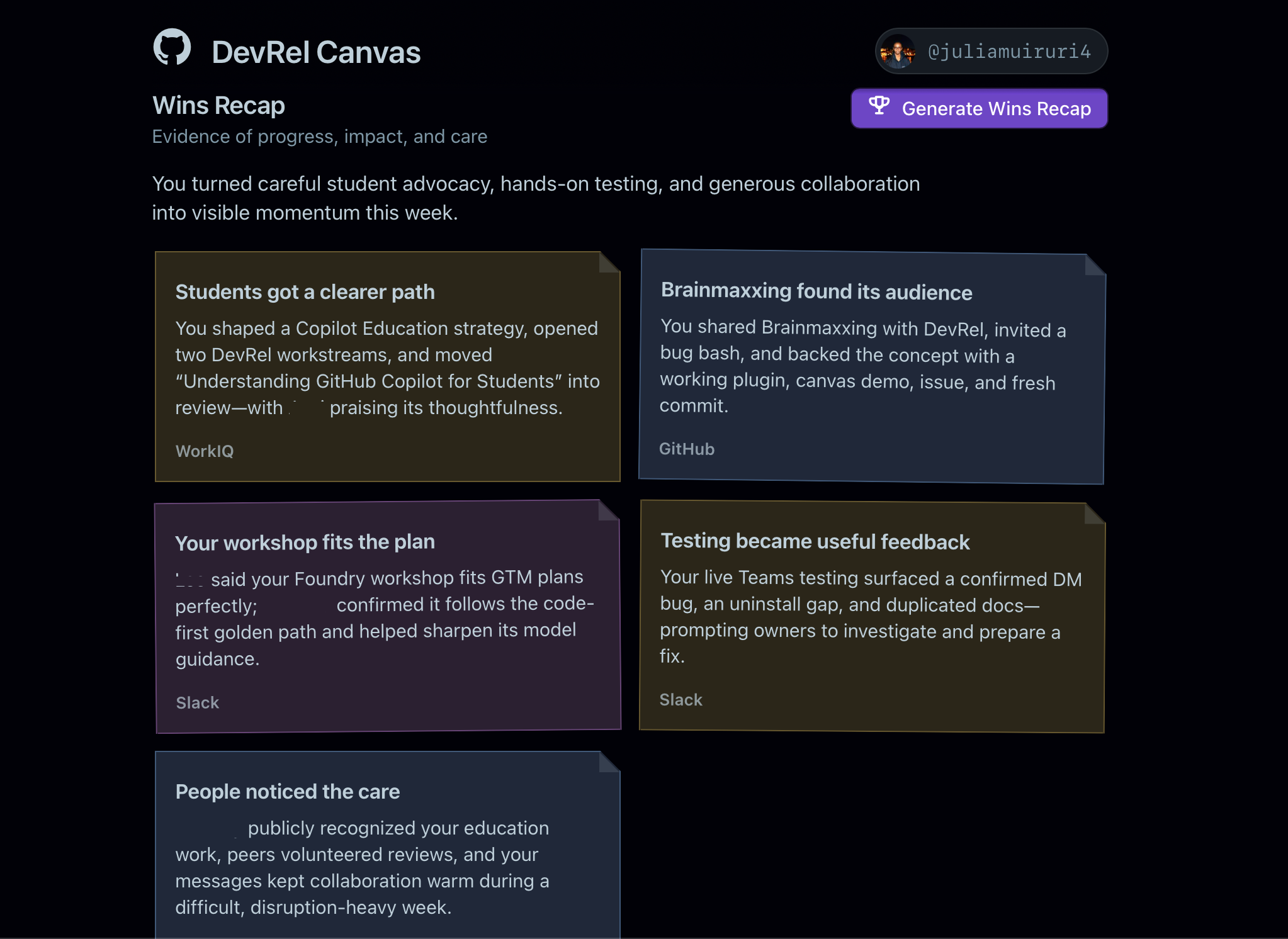
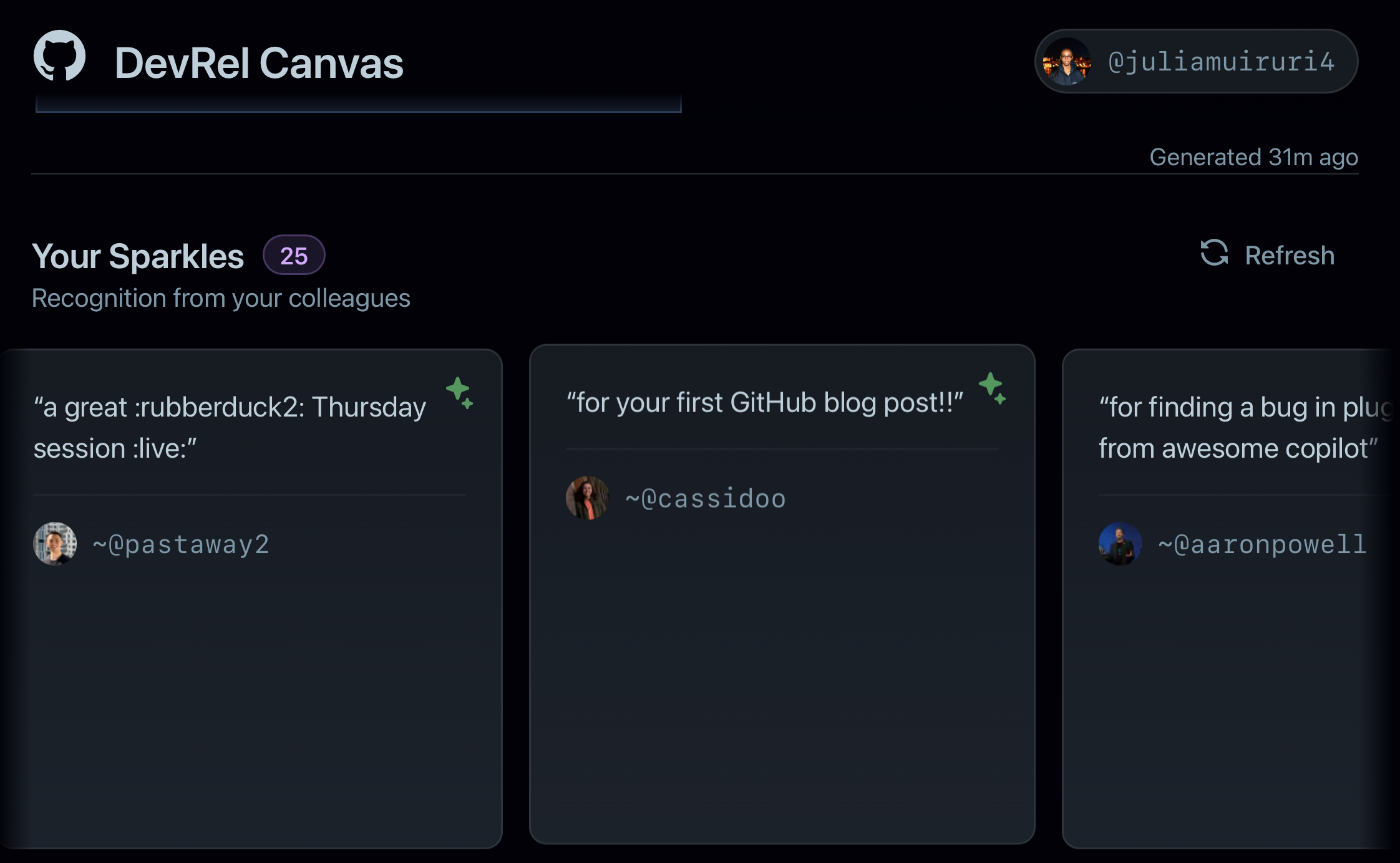
I like getting into work feeling energized and inspired, so the front face of the canvas is designed to remind me of my recent accomplishments and any recognitions or shout-outs from colleagues. Spending a few seconds on Monday mornings reading some recent wins and celebrations reminds me that my work the previous week mattered, had impact, and sets me up to start my week on a positive note - energized, with evidence of progress.
For this, I use:
-
A Wins Recap workflow, one of the 40 automations used by one of my most respected leaders in our team that looks at my work ecosystem - threads on Slack/Teams where I helped solve a problem, DMs, meetings I contributed to in a meaningful way, PRs merged or opened, issues closed, etc.
-
A surface for sparkles from our show-of-gratitude tool, used to let colleagues know that their work, contributions and help are appreciated.
Developer conferences
I’m subscribed to a mailing list that sends out conferences needing support - speakers, moderators, volunteers - every single week. Starting work on Mondays could look something like:
- Staring at a table of all events that need support
- Crossing out events that aren’t within my scope or don’t align with my interests
- For each viable option, visiting the event website and CFP page for additional context - what are the expectations, who will be there, what kinds of talk submissions are they looking for?
- For events that align with my current work or interests, looking for existing resources, from my collection or across the company, that I can repurpose, or designing a brand new talk
- Working on a talk submission and submitting
- If the session gets accepted … (I’ll cover this flow in part II of the series)
The range of events on this list is very diverse, and most times sifting through all of them takes way more time than I’m ever prepared to spend on this particular task. Other times, I completely miss a CFP window because I opened the CFP website in a browser tab thinking I’d get to it later, only to have it buried in hundreds of other tabs.
Spending close to an hour every start of the week working my way through event lists, CFP websites, and evaluating alignment with my work for each viable option isn’t satisfying time on the job, and I needed a solution.
I started by identifying parts of that workflow that I’d rather pour my time and energy into, and figuring out how the canvas could take care of the rest.
- Manually sorting a general list of events (rather not do)
- Reading up about each event to determine alignment (rather not do)
- Drafting a brand new talk (I’d wanna do)
- Customizing an existing talk for re-submission at another event (rather not do)
- Creating an engaging presentation (I’d wanna do)
- Preparing to deliver a banger talk (I’d wanna do)
- Pre-event housekeeping - creating tracking issues, estimating T&E, etc. (rather not do)
- Post-event housekeeping - trip report, expensing, processing feedback, etc. (rather not do)
Now, a single click on the canvas gets an agent to read through the CFP email, extract the event list, and with context about my current work, projects and interest areas, filters down to events that are relevant to my work. For each one, it assigns an alignment score based on its findings about my work.
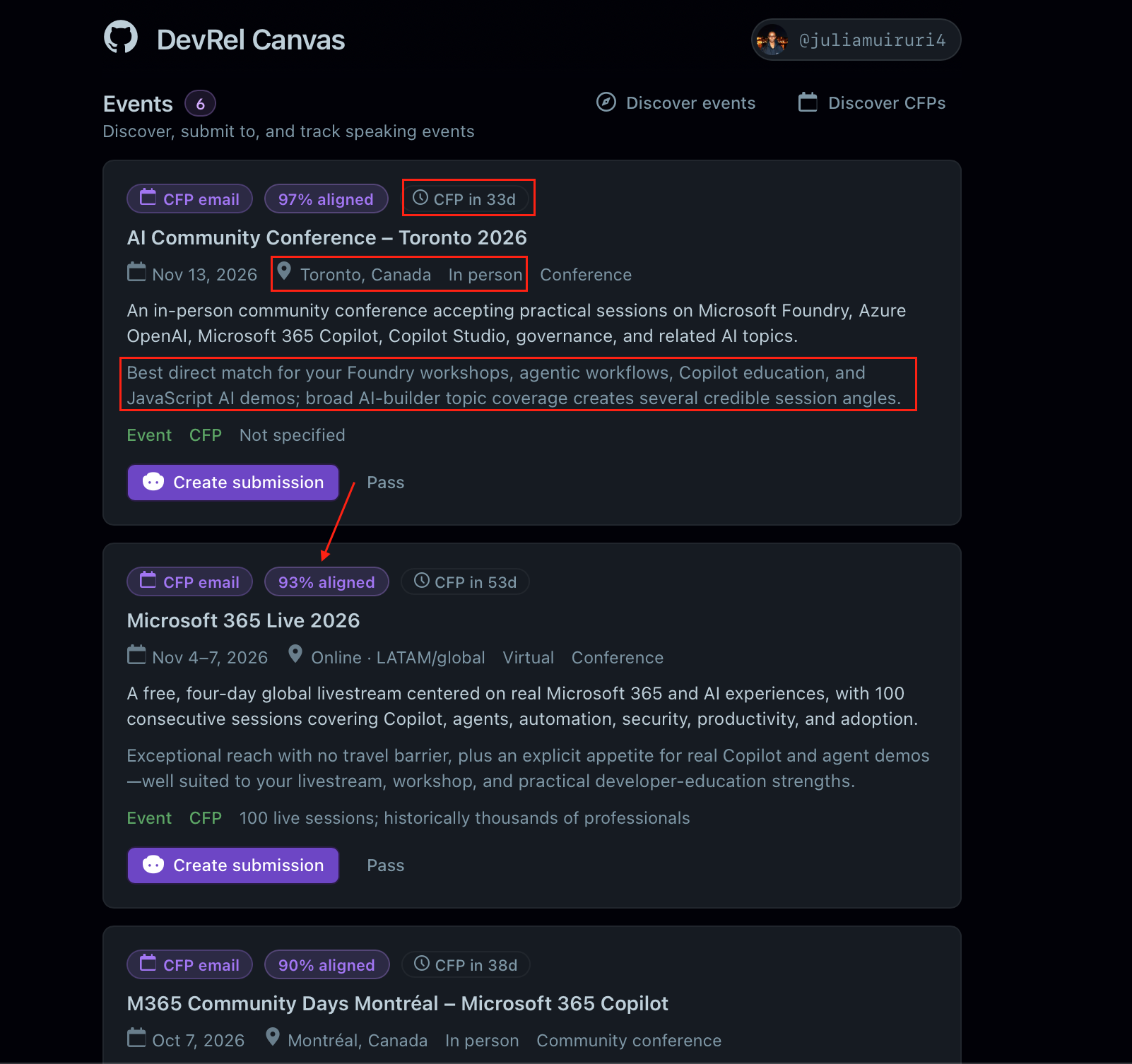
Time that used to go into manually reviewing each event can now go into preparing more engaging and valuable talks - a win for event organizers, attendees and the products I’m advocating for.
Content
What content should I work on next?
I spend way too much time figuring this out. You want to ensure your content is high-value and relevant, timely, impactful and fits into the direction your team or organization is heading.
Requests for content are channeled as issues through a DevRel repo. On any given week, there could be dozens of open issues across different products, formats and audiences. Identifying where to contribute involves a track similar to the CFP one above:
- Scanning through open issues to find unassigned work
- Reading each issue to understand the ask. Is it a blog post, a tutorial, a demo?
- Evaluating whether it aligns with my current scope, projects and expertise
- Checking if there’s existing content I can build on or if it’s a net-new effort
- Factoring in timelines and priority signals from labels, comments or Slack threads
Sound familiar? The outcome is very relevant - the right content, at the right time, for the right audience, but the journey to get there involves time-consuming manual triage that I’d rather have taken off my plate so I can drive my energy into ideas that will make the content meaningful and great.
So, same playbook:
- Scanning and triaging a backlog of content issues (rather not do)
- Evaluating alignment with my current scope (rather not do)
- Researching and ideating on the content itself (I’d wanna do)
- Writing, building or recording the content (I’d wanna do)
- Getting feedback and iterating (I’d wanna do)
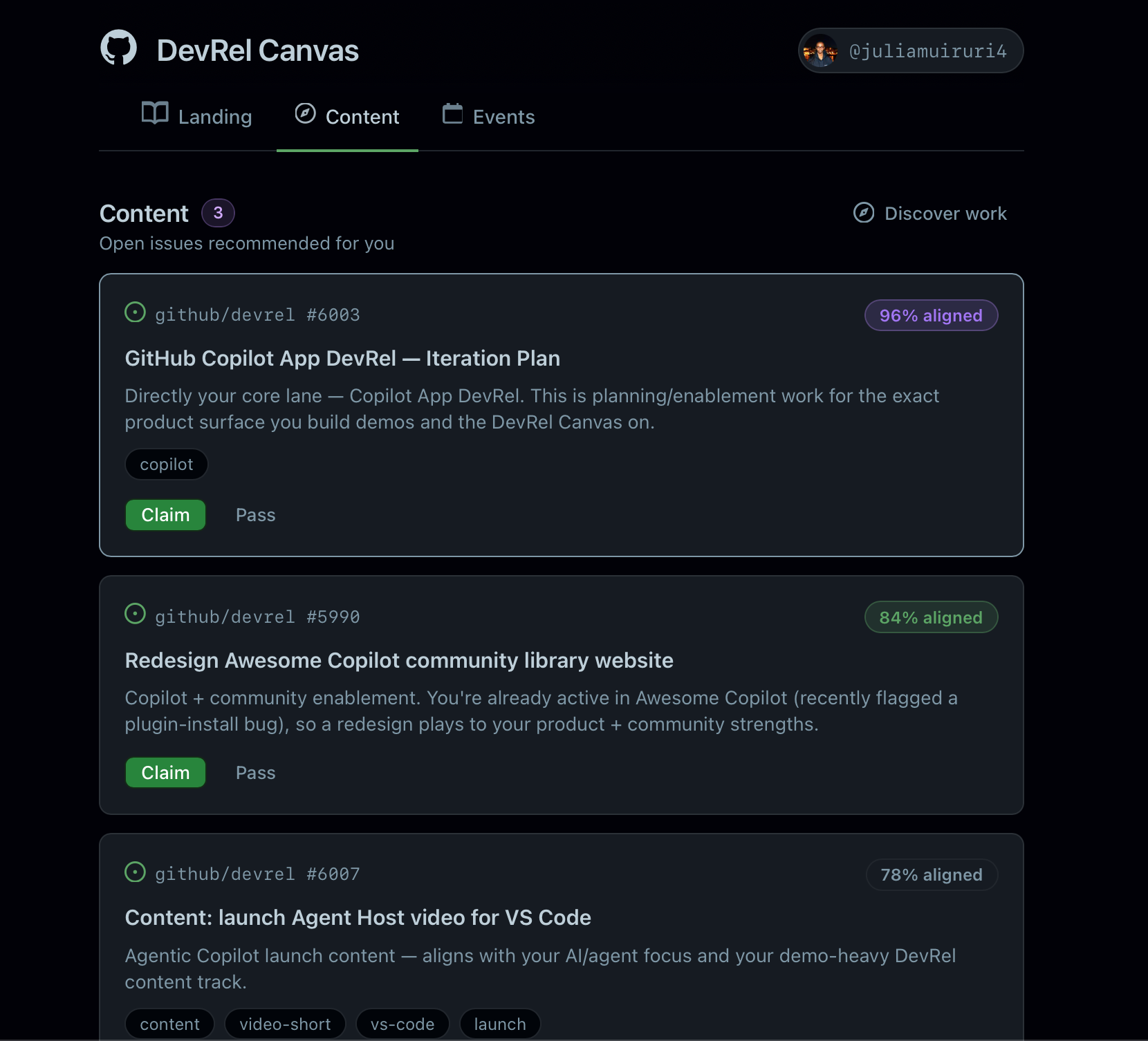
With the Discover Work button, an agent looks through the repo for unassigned issues, filters through the labels, and gets me the top 3 contenders for work that I can immediately dive into. From the canvas, I can either claim an issue - assigning it to myself, or pass and discover more.
Stack
In case you’re curious about how the canvas came to be, I used:
- GitHub Copilot App for an agent-native surface. Why it’s a good fit:
- I spend most of my time here anyway
- I need a tool that lets me easily send agents off to gather context from other platforms (WorkIQ, Slack MCP server, GitHub MCP server)
- Agents! Agents! Agents! An agent to build the canvas. An agent to feed real-time updates onto the canvas, all on a single platform
- Canvas extensions. I don’t want to be restricted to just chat. If I want to see the list of events I can support, I don’t need to be scrolling through my chat transcript for it, so the canvas extension comes in handy
Conclusion
Think about how you spend your days at work. What parts of your job would you rather spend more time on, and which ones would you rather spend less time on?
There - that’s your candidate list for automations and a starting point toward making work feel fulfilling, challenging and energizing.
I have a few more ideas for the DevRel Canvas, which I’ll talk about in the next post.